Specs
A spec is one piece of work you want to accept in a single review:
a feature, a refactor, an investigation. It lives in its own folder,
.agent/specs/<slug>/SPEC.md, and moves through three stations — and
only three:
Backlog → Doing → DoneThere are no tickets. The steps inside a spec are checkboxes under
## Tasks; the agent ticks them as it goes, the board shows 3/7.
A spec that is too big for one review gets child specs (parent:); one
that is too small becomes a task in an existing spec.
A spec is a file
Section titled “A spec is a file”---station: Backlogorder: 10created: 2026-09-09needs_human: falseready: falseopen_question: nullparent: nullmodules: sources, dashboard---# Import skills from any git repository
## WhyOne to three sentences: the occasion, the benefit, who needs it.
## WhatWhat is in scope — and what explicitly is not.
## Acceptance- When a git URL is added as a source, then the app clones it once and shows its skills in the browser.- When access is missing, then the app shows git's message and how to sign in.
## Decisions- D1 (2026-09-09, BO): managed checkouts, no tags needed.
## Tasks- [x] Source model in Rust- [ ] Library in the dashboard- [ ] Docs
## VerificationWhat was run and what was seen.
## QuestionsThe first heading is the title, the folder name is the id — with a
running number in front (012-import-skills), so a spec is
“spec 12” in conversation and in commit messages. New specs take the
next free number; older folders without one get theirs from the
number button above the board. Three optional flags matter to
you as the owner:
needs_human: true— a human must accept this spec (a manual test, an account, a DNS entry). The agent finishes its part, setsready: trueand leaves the spec in Doing for you.open_question: Q1— the agent is blocked on a question you haven’t answered yet. See Questions.- No
order— the spec is an idea; it sorts last in Backlog.
The gate, and what “done” means
Section titled “The gate, and what “done” means”Backlog → Doing is your approval. The agent starts a spec only
when you moved it there (or told it to). Before building it attacks
the spec — missing or untestable acceptance, contradictions, hidden
dependencies — fixes what it can in the spec itself and asks the rest.
Then it works through the tasks, records decisions and what it
verified, and appends an agent_run line to the history.
Done means: every task ticked, ## Verification written, the
history line appended. With needs_human the agent sets ready
instead and you move the spec to Done. Finished specs stay in place:
there is no separate archiving step. Existing historical content in
.agent/specs/archive/ remains discoverable and read-only in spec actions.
The board in the app
Section titled “The board in the app”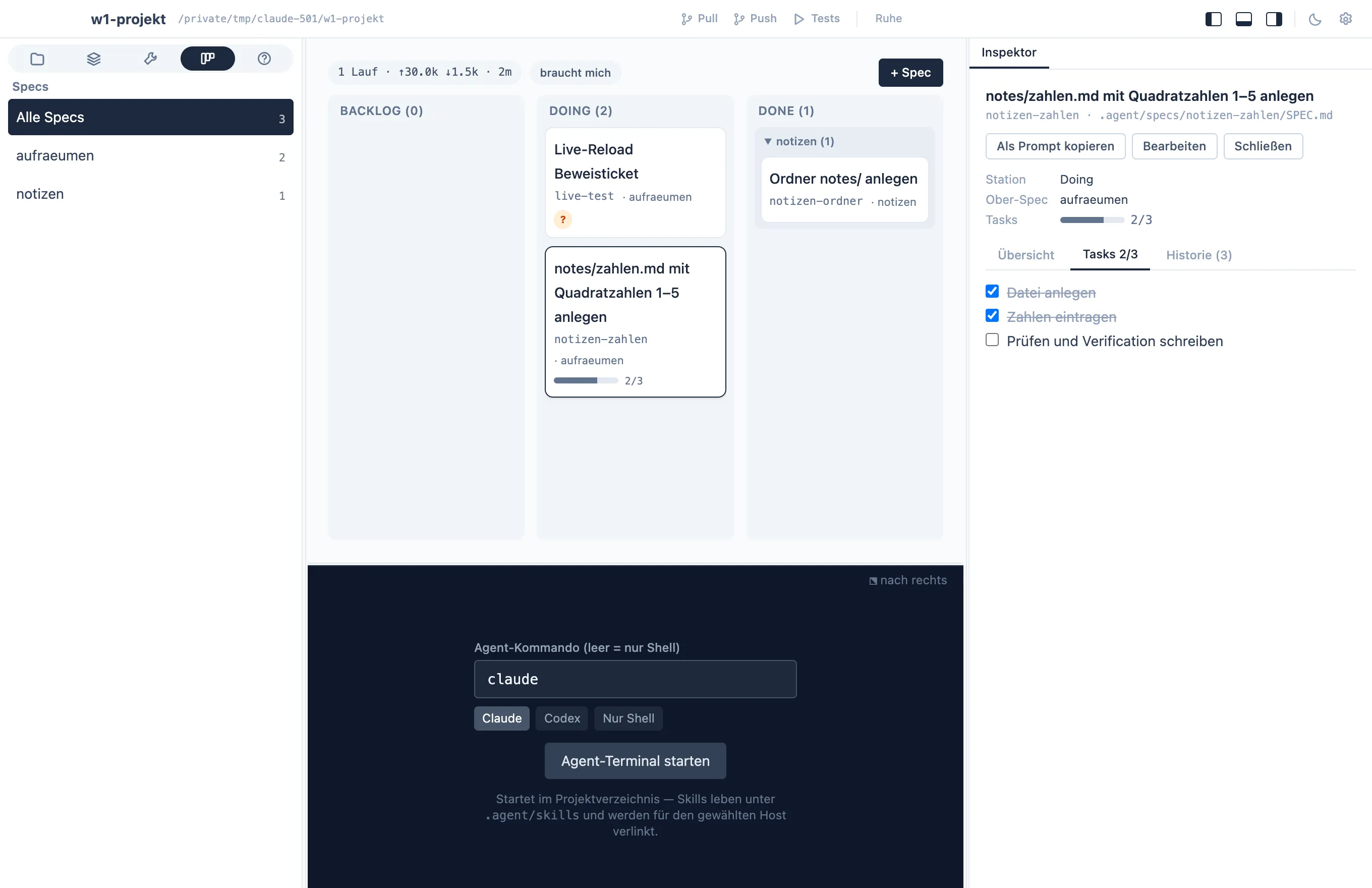
Click a card to open the spec in the inspector on the right: an Overview tab with questions and text, a Tasks tab where you can tick boxes yourself, a History tab with the timeline. Double-click a card, or Edit in the inspector, for the editor sheet; drag & drop moves specs between columns; + Spec creates one from the template. The navigator lists every spec with its number, station and progress. Search by title, number or path and filter by parent above the board, including when the navigator is hidden. The needs me filter shows only specs waiting on you, and Done is grouped by parent so finished work stays legible.
Done shows only what finished recently — by default the last 14 days,
newest first, and at most 10 cards at once; a link-styled Mehr
anzeigen reveals the next 10. Everything older sits collapsed under
Älter and stays clickable and searchable. The column header holds
both settings (7, 14, 30, 90 days or all; 5, 10, 20, 50 cards or all).
They are board settings: Speccify stores them as board.doneDays and
board.doneLimit in the project’s or workspace’s .agent/settings.json,
so they are versioned and the same for the whole team. “Done since” is the
last move to Done in the spec’s history; a spec without history counts
by its file’s modification time. A search or parent filter always shows
every match.
Modules: who touches what
Section titled “Modules: who touches what”Several agents (or people) working on one project collide when two specs change the same part of the system at the same time. Speccify makes that visible instead of hoping it won’t happen:
- The project names its modules — its architecture map — under
modulesin.agent/settings.json: a name (a slug such asterminal,board,api-auth), one line of description and optional paths. Module… above the board edits the list; it is versioned with the project and the same for the whole team. Specs are cut along these modules: as few per spec as possible, so that specs can run in parallel. - Every spec names the modules it touches in its front matter:
modules: terminal, board. The editor sheet has a field for it with the catalogue as suggestions; the agent maintains the field itself and adds a module before it changes code there. - The board warns about overlaps. A card whose module is also named by
another spec in Doing carries a red chip —
⚠ terminal · auch #12— and the inspector says which spec and who owns it. Backlog specs are compared against Doing too, so the warning is there before you move a spec and an agent starts. Done never counts. Modules that are not in the catalogue are marked in the inspector; without a catalogue, the board says so.
The app warns, it does not block: whether to proceed, wait or re-cut is your call. The workflow policy (v11, “Modules and parallel work”) tells the agent to check overlaps before starting, to keep modules per spec minimal, and — when no module list exists — to propose one from the code structure and ask rather than guess.
One register for the whole team
Section titled “One register for the whole team”Working in feature branches does not have to mean everyone sees a
different board. Above the board the app offers to turn .agent/specs
into a shared register: a branch called specs in the same
repository, mounted as a Git worktree at .agent/specs. The path stays
the same for people and agents, but commits there land on specs
regardless of which code branch is checked out. The app commits and
syncs the register by itself — commit, fetch, rebase, push, never force
— and shows the state in the board header: up to date, n unsent,
n new from the team, or a conflict. When two people change the same
line, both versions are shown side by side and you decide; nothing is
lost. A fresh clone mounts the register with one click. Projects without
a register keep their specs in the code branch as before.
Who works on what, in which branch
Section titled “Who works on what, in which branch”Moving a spec to Doing — by drag or with Take over in the inspector —
records the person (your Git identity) as owner and the code branch as
branch, suggesting spec/012-slug when you are on main. Cards show
initials and branch; mine filters to your specs and Doing by
person lists who has what in which branch. The inspector compares the
declared branch with what Git shows — your checkout is elsewhere, the
branch is missing on origin, someone else pushed last, no movement for
days — and only says so; switching branches needs your confirmation.
Release puts the spec back into the Backlog.
What changed while you were away
Section titled “What changed while you were away”Cards that teammates changed since you last looked carry a new mark
with author and commit subjects; one click confirms. A question
addressed with an: your@mail shows up as question for you and counts
in the board header. Optionally, an outgoing webhook posts station
changes, ready, new questions and register conflicts that originate on
your machine to Slack, Teams or Mattermost — the URL lives in the
dashboard settings or an environment variable, never in the project; the
switch is per project.
History: the spec’s memory
Section titled “History: the spec’s memory”Each spec folder has an append-only history.jsonl — one JSON line per
meaningful step:
{"actor":"agent:claude","event_type":"agent_run","summary":"Tasks 3–5; skills: speccify","spec_id":"git-sources","timestamp":"2026-09-09T09:05:30Z","tokens_in":9000,"tokens_out":2200}The app logs what the app changes; the agent logs its own steps.
The event types (spec_created, station_changed, spec_edited,
agent_run) each get an icon in the history tab, and the board’s KPI
row is computed from the agent_run events — runs and effective
input — so the cost of the work stays visible next to the work.
Playbooks: procedures, not work
Section titled “Playbooks: procedures, not work”A playbook describes a procedure — release, deploy, onboarding a
machine. It never finishes; you run it whenever the occasion comes
around. .agent/playbooks/<name>.md, plain markdown, committed with
the code, with a description in the front matter and Copy as
prompt to hand it to the agent. The Playbooks tab lists them,
+ Playbook creates one, and the editor saves as you type.
Draft playbooks
Section titled “Draft playbooks”Choose Draft when creating a playbook to collect ideas or research without
turning it into a standing instruction. The file stores status: draft in its
front matter. Existing playbooks without a status remain active. The list can
filter by status, and the detail view explains whether the content is binding.
Use Aktivieren to explicitly make a draft active, or Als Draft markieren to make an active playbook a draft. Editing or saving alone preserves the status and other metadata. Concurrent changes produce a visible save conflict and keep your unsaved text.
Draft handover offers review or editing, preserving the nonbinding status even in a customized prompt. Speccify rereads the file before copying or inserting the request. An unknown or duplicate status also requires clarification before use. Workflow policy v10 tells the host to treat drafts as ideas, not instructions; this is a workflow agreement, not a filesystem access restriction. Policy v11 adds the module rules described under Modules.
Where the format comes from
Section titled “Where the format comes from”The spec workflow is modeled on
OpenSpec (one folder per
change and tasks as checkboxes) and on
Kiro’s specs (testable requirements,
a human gate between phases). Speccify keeps the format to a single
SPEC.md and adds what those tools leave to you: the board, the
gate, the history with token counts, and the question protocol.
Speccify is meant to fit into what you already use — the heart is
the skill and tool contract management; the spec workflow around it
is one way to run a project, not the only one, and reading OpenSpec
projects directly is on the list. (Not to be confused with GitHub’s
Spec Kit, whose CLI is called specify.)
Specs, playbooks, skills — which is which?
Section titled “Specs, playbooks, skills — which is which?”- A spec is work: it has a station, tasks, and an end.
- A playbook is a procedure you run again and again.
- A skill is know-how the agent applies on its own when the situation matches — see Skills, tools & sources.