Workspaces
Dieser Inhalt ist noch nicht in deiner Sprache verfügbar.
Products rarely live in one repository: an app, a sync service, a
website, each with its own Git history and its own .agent/ folder. A
workspace is Speccify’s answer — several repositories side by side,
without merging them and without a second copy of anything.
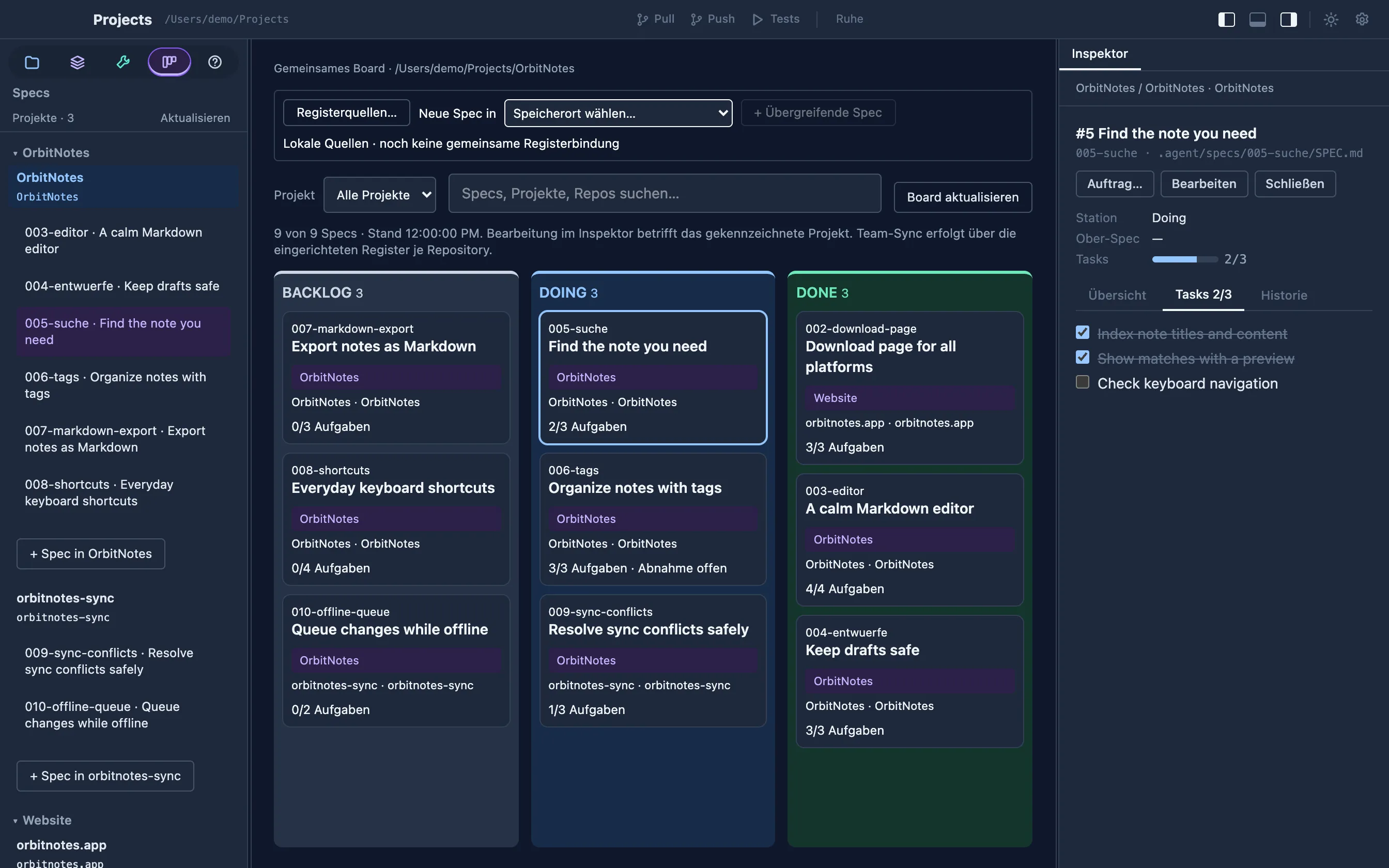
Shared register bindings
Section titled “Shared register bindings”Use Registerquellen… on the board to give registers stable, shared IDs and
bind them to local checkouts. Export workspace-registers.json into an existing
register to share the same board definition with teammates and the Web-Board.
Local paths and credentials stay outside that manifest. When comparing multiple
checkouts of one register, choose the write target explicitly; differing snapshots
produce a warning.
Neue Spec in chooses where a cross-repository spec is stored. The editor’s
Betroffene Code-Repos field accepts comma-separated references such as
api@spec/048-login, web@spec/048-login. Each spec still has one canonical file.
Root knowledge is included alongside child registers, even without Git at the root.
Stale desktop and browser edits are rejected using the displayed spec revision.
Folder discovery
Section titled “Folder discovery”The dashboard’s Projects tab has one entry: choose a folder and open it. The app looks at the folder before anything is stored:
- A Git repository — the folder has its own
.git— opens as a single project in its own window, exactly as before. Nested repositories or example projects inside it (submodules, fixtures) do not turn it into a workspace; choose the parent folder if you want that. - A folder of repositories — no
.gitof its own, but at least one repository or Speccify project below it — is saved as a workspace and opens the shared workspace window described here. - Anything else — a plain folder — opens as a simple project.
Discovery is bounded and read-only: one level below the opened folder by default, no symlinks, no
dependency or build folders, no Git commands, no files written into
your repositories. It recognizes .git folders, .git pointer files
and linked worktrees, and Speccify markers such as speccify.yaml or
.agent/agent.md. Budget limits and read errors are reported separately.
Recently opened projects stay listed under the entry. An invalid path opens nothing and stores nothing.
Choose the discovery depth
Section titled “Choose the discovery depth”In the dashboard, open Settings → Projekt-Erkennungstiefe (project discovery depth), choose 1–16 and save. This setting applies to all workspaces. The opened folder is depth 0; its direct children are depth 1.
Projects/ depth 0 · opened folder├── app/ depth 1 · discovered by default│ └── external/│ └── reference/ depth 3 · requires depth 3└── website/ depth 1 · discovered by default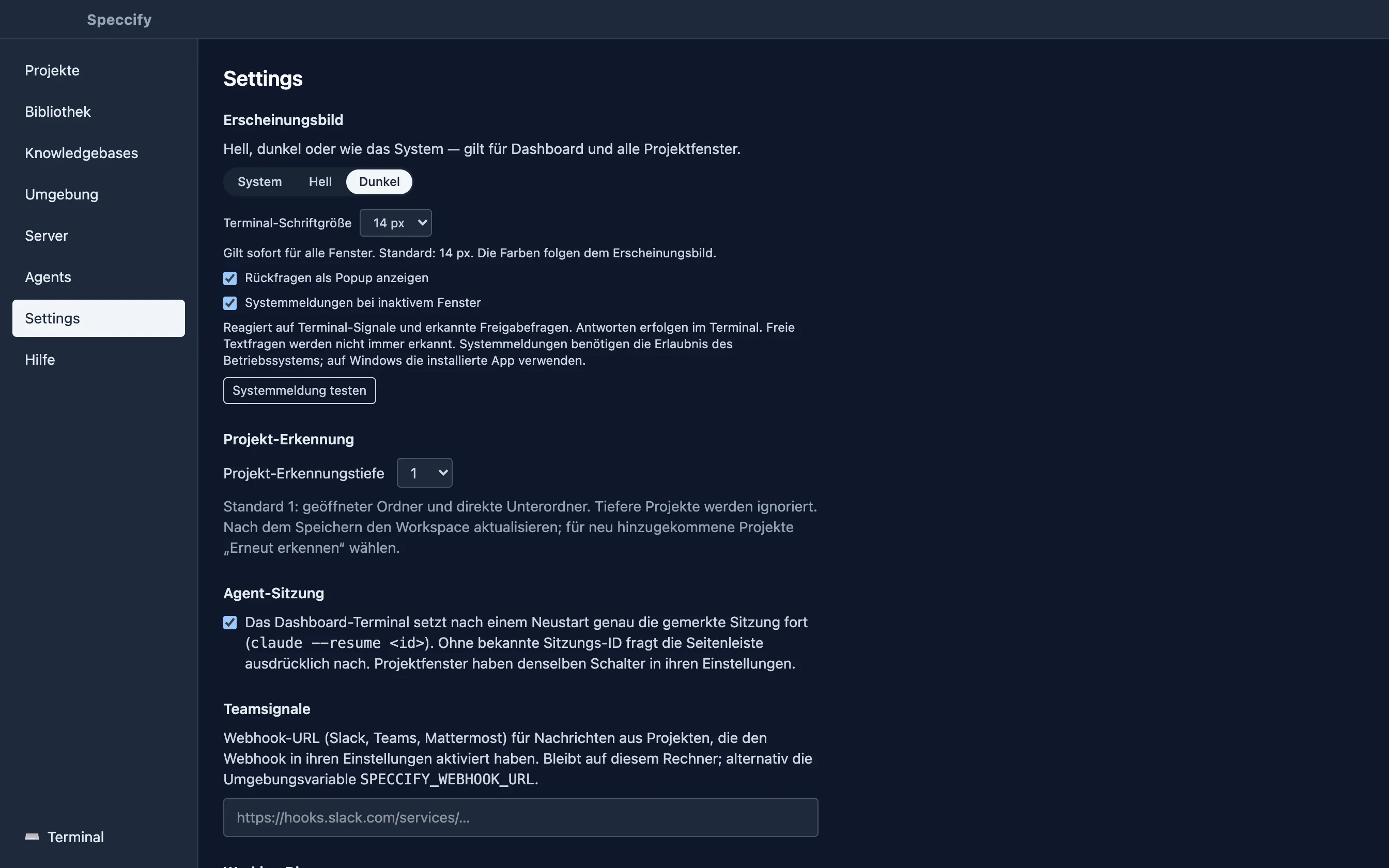
After saving, click Aktualisieren in an open workspace. To find additional repositories, use Erneut erkennen in the dashboard’s saved workspace section. Repositories beyond the selected depth are ignored without a depth warning. Previously discovered entries are hidden from the navigator, shared board and the next terminal’s context. Their names, IDs and groups remain saved and return when you increase the depth. Open editor drafts and running actions keep their original targets while hidden; no repository files are deleted.
An opened folder with its own Speccify guidance can still appear as a root project alongside its child repositories. Separate clones with the same name are separate repositories; linked Git worktrees share one repository identity.
Saved workspaces
Section titled “Saved workspaces”Ordinary folders and root files
Section titled “Ordinary folders and root files”In the workspace’s Files view, Workspace-Ordner opens the parent folder’s
file tree. This includes ordinary directories such as Resources/ and files
beside your repositories. If the root is already a recognized project, its
existing entry serves this purpose. No extra Git repository is created.
You can browse deeper folders while keeping project discovery at its default depth of 1. Git controls belong to actual repositories. If a file is open through both the root and a child project, saving checks for intervening changes and keeps a stale editor’s draft instead of overwriting the other saved version.
Groups and the dashboard
Section titled “Groups and the dashboard”Every workspace you open stays in the dashboard under Saved
workspaces, with a rescan button that picks up new repositories
without touching the groups you made. Each repository starts as its
own project. Select two or more, give them a name and they become one
project group — OrbitNotes with its app and sync repositories, say,
next to the website in a group of its own. Rename a group, or take a
repository back out; every change is local metadata in
~/.speccify/workspaces.json, never a change to the repositories, and
never a merged .agent folder.
All specs shows a read-only board across every repository of the workspace: filter by project, search by title, number or path, open the preview and jump to the spec’s own project window.
The workspace window
Section titled “The workspace window”Open workspace opens one window for the whole folder — the same layout as a project window, with the navigator grouped by project, repository and worktree:
- Shared board. The specs of all repositories on one board, each card naming its project and repository. Select a card and the inspector shows that spec exactly as its project window would: tick tasks, read questions and history, edit the file. Creating a spec names the repository it will land in. There is no drag-and-drop between repositories; a spec belongs to the repository it lives in.
- Skills, tools, MCPs and playbooks — one searchable list per area, with a source label and optional source filter. Root knowledge is included. Equal names remain separate. Select a storage/import target before creating an item; editing and handover keep the original source. Playbooks can be marked Draft without becoming workflow instructions.
- Files, Git and actions — per repository, with root files available in their own context. Switching sources retains editor drafts, commit messages and running action output.
- One agent in the parent folder. The workspace terminal starts your agent command in the folder above the repositories — on your click, never automatically — and hands it a structure summary of the workspace: repositories, guidance paths, groups and the knowledge catalog with exact skill/tool paths and execution roots. You can preview and copy that context before starting. Each repository’s actions and Git operations still run in that repository.
Open workspace windows come back after a restart, like project windows.
MCP definitions display Host-Anbindung ungeprüft; actual connection status is checked in the chosen host. The list itself does not connect servers. A scoped connection request identifies the source and root target; host configuration, credentials and allowlists are never silently combined. Confirm actual availability in the host after its handshake and tool listing.
Team registers in a workspace
Section titled “Team registers in a workspace”The workspace board shows each repository’s team register above the specs,
with its repository name and full worktree path. Existing specs tracked in a
repository with an origin remote can be moved into a shared specs branch:
choose Register einrichten…, review the affected repository and the Git
changes, then confirm with Jetzt einrichten. This commits and pushes the
migration for that repository. Opening a workspace does not start a migration.
For a fresh clone with an existing register, Einhängen mounts it at
.agent/specs. Mounted registers show pending changes, sync errors and conflict
decisions in the same area. Sync applies to the named repository. Use
Aktualisieren after changes made outside the app to check the status again.
A parent folder such as AVC/ does not need its own Git repository: its child
repositories each carry their own register. A folder with no tracked specs has
no migration offer. Unavailable worktrees and projects outside the discovery
depth offer no register actions. Workspace names and groups remain local even
when the contained registers are shared with your team.
What a workspace is not
Section titled “What a workspace is not”- Not a shared team register: the grouping lives on your machine. Sharing workspace membership through the repositories is a separate, planned step.
- Not a merged repository: no common Git index, no combined
.agenttree, no cross-repository refactoring tools. - Not a fleet of agents: one workspace terminal, started explicitly. Project windows keep their own sessions.